Ship a month of social
in an afternoon
Plug your AI stack — Claude, ChatGPT, Cursor, n8n — into PlanSched's REST and MCP layer. Agents draft and queue. You review the calendar and green-light what goes live.
Built for operators, agencies and solo founders who ship on a schedule
How it works
Link your channels once. Hand the wheel to an agent, or drive it yourself. Every post routes through the same shared queue before it ships.
Link your channels
Sign up in under a minute and connect profiles through each network's official OAuth. Nine channels — X, Instagram, LinkedIn, TikTok, YouTube, Pinterest, Threads, Bluesky, Facebook — one connection, one publish button.
Hook up an agent (optional)
Point Claude, ChatGPT, Cursor or any MCP-aware client at PlanSched. Or skip the agent entirely and compose posts by hand in the dashboard — both paths land in the same queue.
Review, approve, publish
Everything the agent (or your team) drafts sits in a shared calendar. Edit, reschedule, or approve in one click. Nothing goes live until you say so.
One instruction — PlanSched routes it to every connected channel.
Try it freeBuilt for the way you publish
Whether an agent is running the show or you're on the keyboard, PlanSched adapts to your workflow — not the other way around.
Autonomous workflows
Give any MCP client — Claude, ChatGPT, Cursor, or your own — direct access to the queue. It drafts, schedules, tags, and re-plans. You hold the veto in the calendar.
Developers & indie hackers
Build your product on top of our OAuth-fronted REST API. Your users link once and reach every network; you never touch a Meta or LinkedIn integration again.
Multi-client teams
Isolate each brand in its own workspace, assign editors and reviewers, and enforce approval gates. Reports come pre-shaped for client hand-off.
Solo operators
Batch a whole month in one sitting. AI drafts in your voice, optimal-time windows fill themselves in, and you approve on your phone between meetings.
Short-form volume
One clip, four aspect ratios, six destinations. Post the same short to TikTok, Reels, Shorts, X, YouTube Shorts and Facebook without duplicating work.
Bootstrapped brands
Run distribution yourself while the team is small, then delegate to an agent (or a hire) when it grows — without switching tools or rebuilding your calendar.
One console for every channel,
every client, every draft
The parts you expect from any serious tool — a shared calendar, per-channel analytics, workspaces per brand, sign-off workflows — plus the parts nobody else ships: agents that draft into the queue, an editor for short-form clips, and a mandatory human checkpoint before anything reaches your audience.
Shared publishing queue
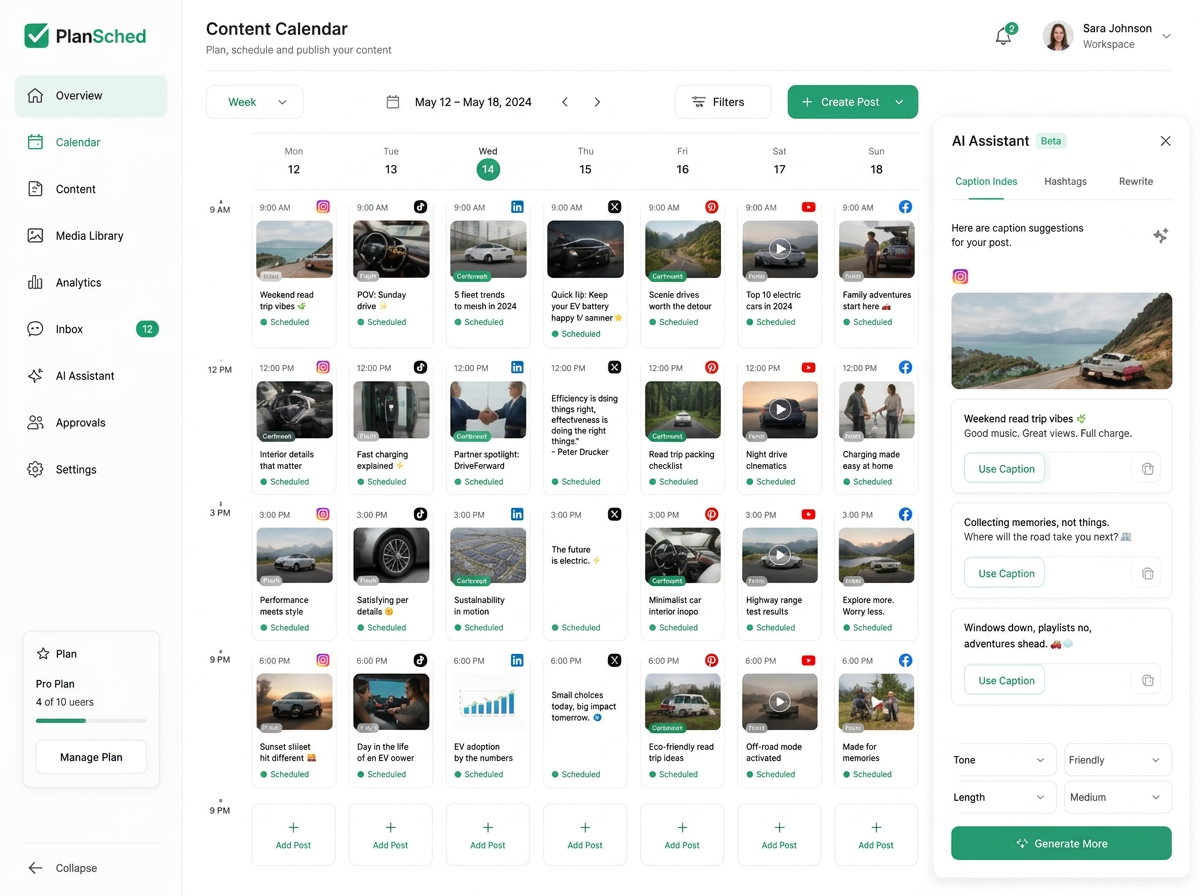
Every draft, every reschedule and every approved post lives in the same drag-and-drop calendar — one brand or fifty.
Reporting your clients understand
Reach, engagement and follower deltas per profile, exported as clean summaries you can send without cleaning up first.
Workspaces, roles, approvals
Give each brand its own room, invite editors and reviewers, and lock down which roles can hit publish.
MCP-native scheduling
Any modern agent — Claude, ChatGPT, Cursor — can call the same tools your dashboard uses. No middleware to maintain.
Approval gate by default
Whether a human or an agent drafted it, the post waits in the queue for a one-tap approval before it reaches the network.
Short-form clip editor
Caption, overlay and re-crop clips for Reels, TikTok, Shorts and X without ever leaving the composer.
PlanSched vs. the rest
| PlanSched | Legacy schedulers | |
|---|---|---|
| Multi-network queue & drag-drop calendar | ✓ | ✓ |
| Per-profile analytics & shareable reports | ✓ | ✓ |
| Workspaces, roles & sign-off flows | ✓ | ✓ |
| Programmatic API access | ✓ | ✓ |
| Agent-native MCP surface | ✓ | — |
| Mandatory review gate before publish | ✓ | — |
| Short-form clip editor in-app | ✓ | — |
| Entry point | Free for 7 days | Often $99+/mo |
The features enterprise plans upsell — MCP included — from day one, without the entry-tier surcharge.
A publishing surface any agent can talk to
One REST endpoint set and one MCP server give Claude, ChatGPT, Cursor, n8n or your own workflow direct write access to nine networks. Skip the pre-built templates — wire PlanSched straight into your stack and keep the approval calendar as your safety net.
Tools your agent can call today
list_workspaceslist_postscreate_postMore tools (media, analytics, engagement) shipping over the coming weeks.
Add PlanSched to any MCP client
{
  "mcpServers": {
    "plansched": {
      "command": "npx",
      "args": ["-y", "plansched-mcp"],
      "env": { "PLANSCHED_TOKEN": "smm_your_key" }
    }
  }
}
>_ Then ask your agent — plain language
> Schedule "Shipping today 🚀" to my LinkedIn
  and X for tomorrow 9am.

✓ create_post → queued for 2026-07-10 09:00
  Review it in your PlanSched calendar.
A public REST API is on the roadmap. Today, MCP is the way in.
Connect Claude, Cursor or any MCP client and schedule posts in plain language — no glue code.
Turn a release, a form, or an RSS item into a scheduled post from any n8n workflow.
Let LLM-driven agents watch trends and publish on their own, while you keep approval control.
Your agent already knows
how to drive PlanSched
The MCP tools are named the way an LLM expects. Describe the outcome — the model picks the right call. Everything still routes through the approval queue before it reaches an audience.
Works with any MCP client — Claude, ChatGPT, Cursor, Hermes, OpenClaw & more.
A short-form studio, one tab away
Drop in a clip, layer on hooks and captions, and push the finished piece to every vertical surface — Reels, TikTok, Shorts and X — without touching another editor.
- Trim, crop and re-frame clips without leaving the composer.
- Overlay captions, hooks and lower-thirds tuned for silent playback.
- One export, four aspect ratios, six destinations.
- Fire the finished piece into the approval queue for every connected account.
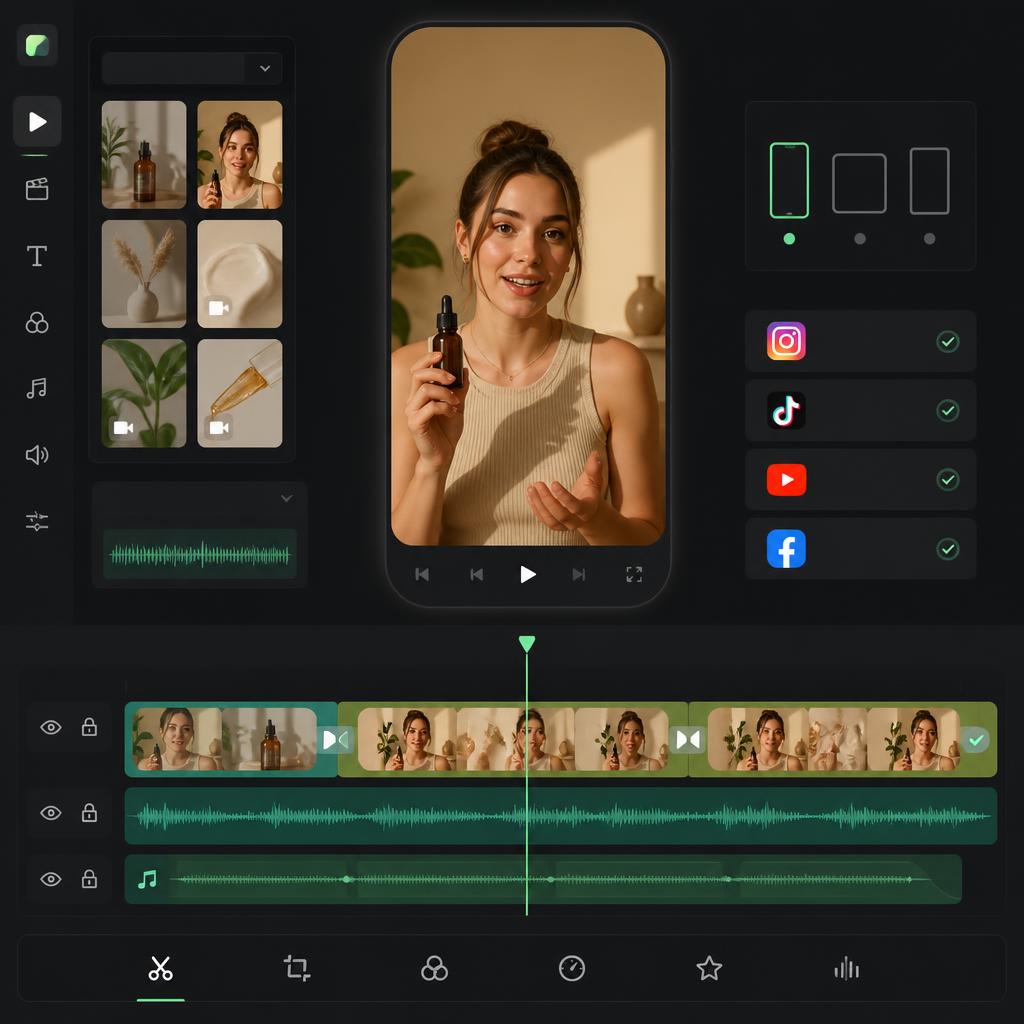
Edit once, then publish your UGC clip to every account automatically.
Upload your clip
Drop in a short video. Trim it, set the aspect ratio, and get it ready for vertical or square formats.
Add text & overlays
Layer on captions, hooks, and text overlays to turn a raw clip into authentic, scroll-stopping UGC.
Publish everywhere
Schedule and post your finished video programmatically to one or many accounts across every platform at once.
Made for operators
across the stack
Here is what each kind of user actually gets on day one.
Drive the whole calendar from Claude or your own agent over our MCP server, and get HMAC-signed webhooks on every post lifecycle event.
Group profiles into per-client workspaces, send a public approval link, and keep one predictable bill instead of a seat charge per brand.
Batch a month of content in one sitting and let AI captions match a brand voice you define, not a generic template.
Wire product releases into an n8n flow that posts across networks automatically, with retries when a network returns an error.
Connect your social media accounts
Everything included, on every plan
No usage-based surprises. These are product capabilities, not customer averages.
Flat pricing per plan — not a seat charge per client brand
Scheduled posts from the Gold plan upward
Client approval links before anything publishes
Upgrade, downgrade or cancel from settings in one click
Run every client from one console
Purpose-built for social managers and agency operators. Group profiles by brand, delegate drafting to editors or an agent, enforce a sign-off before publish, and reclaim the hours you used to lose to context-switching between clients.
Get Started for FreeFree plan, no card required.
Put Instagram on cruise control
Queue Reels, carousels and single images weeks ahead, drop in a story reminder, and let PlanSched fire the first comment and hashtag set the moment a post lands — all from the same calendar you already use.
Consistency, without the grind
PlanSched handles the ideation, drafting and publishing loop across Instagram, TikTok, LinkedIn, X, Pinterest, YouTube and Facebook. You approve; audiences and reach do the rest.
- AI ideas, captions, carousels, and hashtag helper built-in.
- Best-time-to-post insights for every network and format.
- One calendar for Reels, Shorts, Pins, carousels, and more.
Free trial available. Cancel anytime.
Own your seat before the door closes
A hundred early supporters get a one-time flat fee in exchange for lifetime access to every tier we ship.
Platinum-level features. No renewal. No surprise upgrade wall.
One payment. Forever access.
A browser sidekick for engagement
The PlanSched browser extension is in development — it will suggest replies inline so comment sessions take minutes, not hours. Join the waitlist and we'll email you at launch.
Join the extension waitlistAll-in-one social media management
One toolbox, every network,
measurable output
The scheduling, publishing and reporting surface creators, marketers and agencies actually need — nine networks, one queue, real analytics. No stitching required.
Visual Content Calendar
Drag and drop posts across days, reschedule campaigns in seconds, and keep every social channel aligned in one calendar view. Plan weeks of content at a glance.
Best Time to Post Calculator
Stop guessing when to publish. Our scheduler analyzes your audience activity and surfaces the optimal posting windows for Instagram Reels, TikTok videos, LinkedIn updates, and more.
Instagram Scheduler & Suite
Schedule Instagram Reels, carousels, single images, and story reminders. Add your first comment automatically and apply saved hashtag sets to every post.
TikTok Direct Publishing
Upload short-form video, write captions, set privacy settings, and auto-publish TikTok content directly — no manual steps or phone reminders needed.
LinkedIn Post Scheduler
Schedule posts for personal profiles and company pages. Supports text updates, multi-image posts, document shares, and link previews — all reviewed before they go live.
X Thread Composer
Write and schedule X threads with media, links, and custom UTM parameters. Reorder posts before publishing and track click-through performance afterward.
Pinterest Pin Scheduler
Plan Pinterest Pins, select boards, write keyword-rich descriptions, and let PlanSched automatically recycle evergreen content to keep your profile active around the clock.
YouTube & Shorts Scheduler
Queue YouTube videos and Shorts for publishing at the right time. Manage titles, descriptions, tags, thumbnails, and end screens without leaving your content dashboard.
AI Caption & Content Generator
Generate on-brand captions, content ideas, carousel scripts, hooks, and hashtag suggestions using AI — then schedule directly without switching tools.
Social Media Analytics & Reporting
Track reach, impressions, clicks, watch time, and follower growth across every channel. Export reports and attribute traffic with UTM parameters built into every post.
Bulk Scheduling & Content Queue
Import posts in bulk via CSV, batch-schedule entire campaigns, and let PlanSched loop evergreen content automatically so your channels never go quiet.
Team Collaboration & Approvals
Invite team members, assign roles, and set up approval workflows so every post is reviewed before it goes live — ideal for agencies managing multiple client accounts.
Free trial available. Cancel anytime.
Frequently Asked Questions
How do AI agents post through PlanSched?+
What's included in the MCP server today?+
Which agents and automation tools work with PlanSched?+
What social platforms do you support?+
Why switch from Buffer or Hootsuite?+
How many social accounts can I connect?+
Can I connect two accounts on the same platform?+
How many posts can I schedule per month?+
Will my posts get less reach using this app?+
Do I need to share my social media passwords?+
Can I upload images and videos?+
Can I cancel anytime?+
What kind of support do you offer?+
Grow your social presence with the best tool
for creating content
Schedule posts, find your best time to publish, and keep your calendar full — without the chaos. PlanSched makes consistency simple across every channel.
Start for freeFree trial available. Cancel anytime.